Nearly every time I see a complaint about git, someone comes through with a command like this. Is there a collection of similar tips that makes git better to use? If not, there should be.
Overcoming network effects cannot be the goal; otherwise, work will never get done.
The goal should be to build a full spec and then build a code forge and ecosystem around this. If it’s truly great, adoption will come. Microsoft doing a terrible job with GitHub is great for new solutions.
I recently redesigned my blog to look like a modern RFC and I'm loving the way they've decided to render tables in their plain text, definitely gonna steal that.
On topic though, Stripe is trying to make themselves the Visa/Mastercard of crypto. They're in position to do so and it seems like Coinbase is their other half. I don't trust or like it though.
I’m always impressed by people who are hardcore EMacs or Vim devs, their setups are impressive af.
I’m a GUI guy though. As soon as I try delving in, I abort when I see things like “just type c-C dingle bob to do x thing.” I’m happy these people found something that works with their brains. I just want a GUI that works like what they use.
I recently saw a Zed fork stripped of AI stuff but there’s no binaries yet (you gotta compile and get an Apple dev account and I don’t care enough). Zed and Sublime Text are the closest to my stylistic sensibilities but I’m always on the lookout for something better.
If you’re one of these EMacs freaks who also love GUIs, sign me up to your app!
> I’m a GUI guy though. As soon as I try delving in, I abort when I see things like “just type c-C dingle bob to do x thing.” I’m happy these people found something that works with their brains. I just want a GUI that works like what they use.
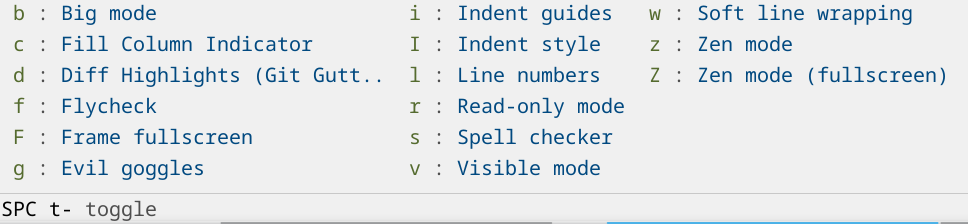
You do have that somewhat with packages like which-key that will show you a menu of options every time you press a key. You then learn the keybinds that you use the most. You can also search for them by name and see the keybind like you do with VS Code etc..
Here's what doom-emacs looks like when I press space and then space-t:
> I just want a GUI that works like what they use.
I don't think this is really possible. The thing that makes it special is that there are key binds for all the 100s of things you could want to do. So it becomes sort of like playing a instrument where you use your muscle memory instead of thinking specifically about the keys. If you make a bunch of menus and buttons to do the things it would be a mess and probably not very nice to use. Emacs actually has buttons and GUI controls for lots of the functionality, but it kind of sucks to use it that way.
These setups are impressive specifically because the creator has put in the time and effort to become an expert at using their editor. There is just no way to hand that over to someone else as-is without any investment from the recipient in skill development.
A nice way to get quickly familiar with how to use emacs/(neo)vi(m), understand how keybindings work and how to uncover new ones, is to go through reading/practicing the built-in tutorial. It almost plays like games.
When opening a freshly installed emacs, there should be a "Emacs Tutorial" link that can be clicked; also the keyboard shortcut `C-h t` (which is «Control + `h`, then `t`»).
There is a similar feature in `neovim`, when opened type `:Tutor` (which is «`:` to open the command prompt, with command `Tutor`»).
>I abort when I see things like “just type c-C dingle bob to do x thing.”
I used nothing but emacs for several years (well, xemacs, but close enough), because I was using an old Thinkpad, and long-term use of the trackpoint gave me RSI in my finger. Being able to use nothing but the keyboard was nice.
Eventually I went back to BBEdit and have remained there. You can make it mostly keyboard oriented if you want, but sometimes using the mouse is easier/faster, and I have a lot of reps inside of BBEdit. It just seems more like home to me. A nice balance between GUI and keyboard-focussed IMO.
I'd say most people run Emacs in the GUI mode, not in a terminal. So these days, you're pretty much on the same level as most rivals.
Sadly, "these days" is a low bar. The days of consistent platform-specific "Human Interface Guidelines" are over, it's all just a browser wrapped in a top-level window or something that simulates that, with most interaction patterns being a cargo cult of how it's remembered from the 90s. So "GUI" means that some unique overlays can be drawn without a fixed width character grid and that you might get the original file requester now and then.
I mostly run Emacs in a terminal, except I configure for two finger scroll on Mac trackpad and tap to move cursor. I also reduced the size of my .emacs by 60% in the last year.
The binary release for Linux is a bit rough, there's an `install.sh` script in the repo which can install the tarball for you. For the next release there will be flatpaks, .deb and .rpm available.
What was the Apple Dev account needed for? Previously I remember it was only needed for submitting apps to the App Store, not running Dev builds locally.
Last I checked it was just to notarize the app but I went back to the fork to remember and now there are binaries! https://codeberg.org/GramEditor/gram
> I just want a GUI that works like what they use.
TL;DR: Emacs is a GUI app and has lots of GUI-related functionality, but it tends to be slightly neglected by the majority of users. You can easily build your ideal GUI using the provided building blocks; the problem is, you have to build it, since most other users are not interested in doing so.
Both Emacs and Vim/NeoVIM have GUIs. I can't even run my Emacs in a terminal without `-q` (omit user config) - I never feel the need, and my config would be much more complex if I tried to make it terminal-friendly.
You don't need baroque keybinds, either. Both Emacs and Vim have always had "Command Palette" - Alt+x in Emacs, : in Vim - and with a few plugins[1], you get fuzzy matching, inline docs, icons showing what type of command you're looking at, etc. Both editors also have GUI buttons and mode-specific (on top of generic) menus (including context menus on click). This provides unmatched discoverability of available functions - you can then bind them to any key combination you find easy to remember. You don't have to, though, since with a few other plugins (Orderless), the frequently used commands bubble to the top of the list.
There are two things Emacs handles a bit poorly: mouse and popups. The former stems from existing users largely ignoring the issue, but the hooks for clicks and even gestures are there. The latter is an unfortunate consequence of wanting TUI to remain first class. There is functionality for creating Emacs "frames" (GUI windows) with given dimensions and a specified position, but it's basically GUI-only. Things like auto-completion popups default to something that can be emulated in the terminal, with frame/window-based implementations provided as extensions. That means that you can have a pop-up with method names starting with a few characters you typed, you can even have another pop-up beside that with docs for a given method, but you generally won't get that doc displayed as rendered markdown (you can't display headers with a bigger font in a terminal). It's 100% social and not a technical limitation - if you accept that you're only going to use Emacs in a GUI, you can get an IntelliJ-level of mouse and popup handling... Though it takes some effort.
That's the real problem, I think. You need to craft many of those features yourself out of available functionality. And it's not even a matter of some (even obscure) configuration, you will need to write your own Lisp to get the most out of Emacs. That's much more of a pain point and a respectable reason for not wanting to touch it. Technically, though, Emacs is not anti-GUI, and there are many packages that make Emacs pretty. Less so with mouse-friendliness, unfortunately, but you can configure it into something half-decent without much effort.
The only environment I know of that is (at least) equally powerful and flexible, but which handles GUI better is GToolkit[2] (VisualWorks was nice before the license change; now it's impossible to use) - a Smalltalk-derived system that uses the host OS (Linux/Windows/Mac) GUI directly through Rust bindings. A step down from there, but still respectable, is Pharo and the browser/Electron. Other than that, you have pre-written GUIs that you can't really change beyond what the developers planned.



Nearly every time I see a complaint about git, someone comes through with a command like this. Is there a collection of similar tips that makes git better to use? If not, there should be.
reply